File resources
You can define text-based resources. You can then use these resources, referred to as "file resources", in annotations, in service method implementations, and in classes associated with a server.
To define a file resource, follow these steps:
-
Open the Service Definer.
-
Choose Define, File Resources from the main menu.
The File Resources window is displayed.
- Set Resource Path to the filepath leading to the resource in your server .JAR.
Example
The resource path for a file resource used in the "com.usoft.service" package could be
com/usoft/service/myfilename.xml
- Write the resource content in the Resource field. Save work.
To associate the new file resource with a server:
-
Open the Servers window and retrieve the Server that you want to associate the file resource with.
-
Click the File Resources tab.
-
On an empty line, click the lookup button, select the file resource you just defined, and click OK to confirm. Save work.
Using a file resource in a class or in a service method
If you want to use your file resource in a service method, you can implement it by using the standard java methods available for IO operations. Here is a simple example that will return a resource that is an HTML file:
java.io.InputStream is = getClass().getResourceAsStream("index.html");
java.io.BufferedReader reader = new java.io.BufferedReader(new java.io.InputStreamReader(is));
String response = new String();
String line = "";
while((line = reader.readLine()) != null){
   response += line;
}
return response;
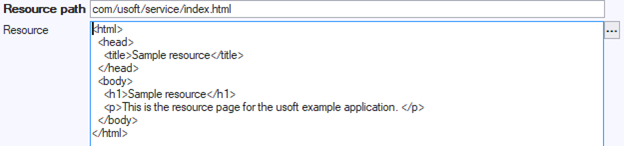
The file resource used in this example is: