Extending your response when a request is throttled
When throttling of requests is enabled for a Server, if the number of incoming requests exceeds the throttling limit, you will get a status code 429 and a message that the server is getting too many requests.
You can add your own text to the default response message by using the functional type ThrottlingHook in a class. For example, if you want to inform the user that he can try again after a predefined time, you can add the "Retry-After" header.
To achieve this:
-
Create a new class.
-
Press the lookup button at the Functional Type field. In the Functional Types window, select the ThrottlingHook functional type. If this functional type does not exist yet, insert it in a new record by setting:
Functional Type = ThrottlingHook
Implemented Interfaces Names = com.usoft.uservice.server.IThrottlingHook
-
Press OK to confirm that your new class has the ThrottlingHook functional type. Save Work.
-
Choose Actions, Add Unimplemented Methods from the main menu.
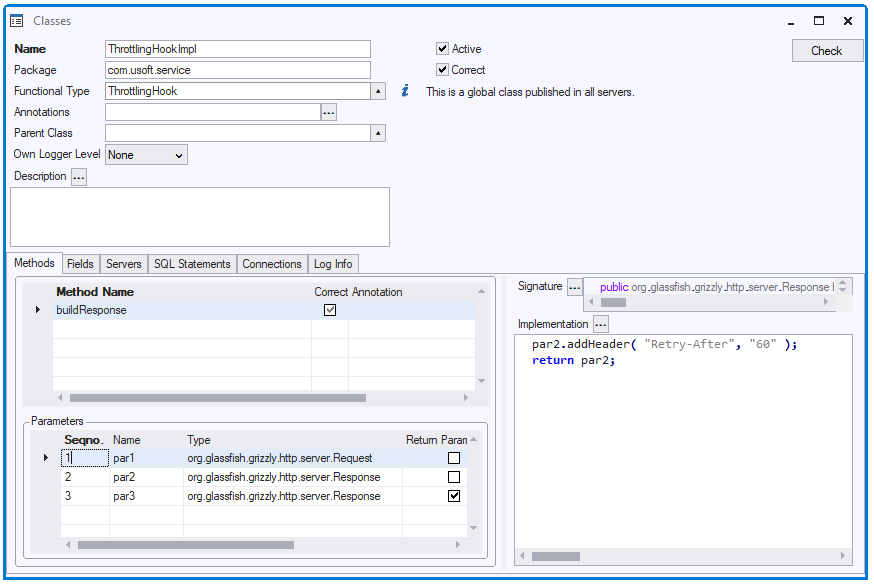
This will add a method ‘buildResponse’ with 2 input parameters, a request and a response, and a return parameter.
-
Add your logic to the incoming response object and return that response.
-
Click the Servers tab in the Classes window and add the class to the desired server(s).
Your class could now look like this: