Welcome to USoft Knowledge Base!
Welcome to the USoft Knowledge Base.
If you notice any issues or unexpected behavior, please let us know through our Customer Portal.
Your feedback helps us improve!
- Do you want to expand your own knowledge and skills of USoft in a structured, effective way?
- Are you looking for the best way to train people who join a USoft project team?
- Do you want identify or assess USoft knowledge and skills in yourself or others?
This page is the good place to start! It tells you about Product information and Tutorials and courseware
Product information
USoft supplies standard documentation with all its products.
Knowledge Base
At docs.usoft.com, the Knowledge Base section features explanations, tutorials, and how-to instructions. In many sections of docs.usoft.com, within and outside the Knowledge Base, you will find additional resources and contributions by people within USoft and external to USoft.
In-product Fields Help
Some USoft applications (USoft Definer, USoft Authorizer...) offer in-product Fields Help. This is instant information on the meaning of a field that you have currently in your screen.

Fields Help for "Default Insert Scope” in the Roles window (USoft Definer)To get in-product Fields Help:
- Locate the "What's This” button on the icon ribbon just below the menu:

- Click on the "What's This” button:

Your mouse pointer changes into a pointer with a question mark.
- Move this mouse pointer to the field that you want assistance on, then single-click on the field.
In-product Property Help
The USoft UI tools (USoft Web Designer, USoft Windows Designer) offer in-product Property Help for each property of each control. This is instant information on the meaning of a property that you have currently selected in your Property Inspector.
Property Help text appears in a pane with a yellow background at the bottom of the Property Inspector :
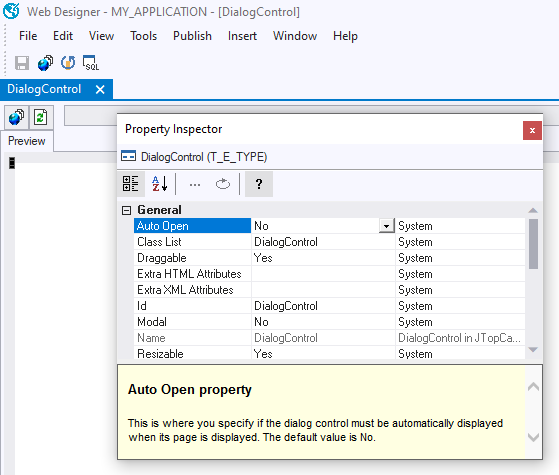
Property Help for the Auto Open property of a DialogControl in Web DesignerTo get in-product Property Help:
-
On the control class that has the property, right-mouse-click and choose Property Inspector. The Property Inspector opens.
-
Select the property you want assistance on. The property name is now highlighted by a dark blue colour (see the "Auto Open” property selected in the picture).
-
Locate the Show Help button on the icon ribbon at the top of the Property Inspector:

Show Help button in Property Inspector. You can toggle this button on and off to display or hide the Property Help text.
Studio Help
USoft Studio is a stand-alone web site with its own PDF and on-screen help. Click the Help link in the top right corner, or browse the Help pane in the Home screen, or click on question mark icons in more specific areas.
Tutorials and courseware
USoft supplies tutorials and courseware for learning how to put the USoft platform to best advantage.
Tutorials in Knowledge Base
At docs.usoft.com, where you are now, most sections of the Knowledge Base are tutorials. Some are reference sections: this is marked by a blue "REF.GUIDE” tag. The Knowledge Base is the part of USoft Community that is curated by the USoft R&D team.
Many colleagues never access Community in any other way than via the Search bar. They use Knowledge Base like they use Wikipedia. This is absolutely fine, but when you are learning, to get a sense of overview, it can also be nice to drill down into the carefully named and sequenced chapters and sub-chapters of Knowledge Base. In Community Home, press the USoft Knowledge Base tile, or.
Courseware exercises and solutions
USoft maintains and sells courseware modules that map 1:1 to the different Knowledge Base sections. Courseware is different from Knowledge Base tutorials in that it adds
- Slide decks for presentation,
- actual example software called “demoapps” that you can install, run, and develop further to try out. The “demoapp” examples are Travel Agency (a tour operator) and EU-Rent (a car rental company).
- hands-on exercises and solutions tested against these demoapps.
Courseware is ideal for training in a classroom setting, but also suitable for online teaching and for self-study.
Please contact your USoft representative or USoft Support for information on how to obtain and use courseware.